 ctxmenu
Favourites
A list that stays, and the three ways a file gets from the menu to a web tool.
A favourite is set up once and stays. From there it can be placed in the menu as often as you like, at any spot, without being built again — the only thing still asked is where.
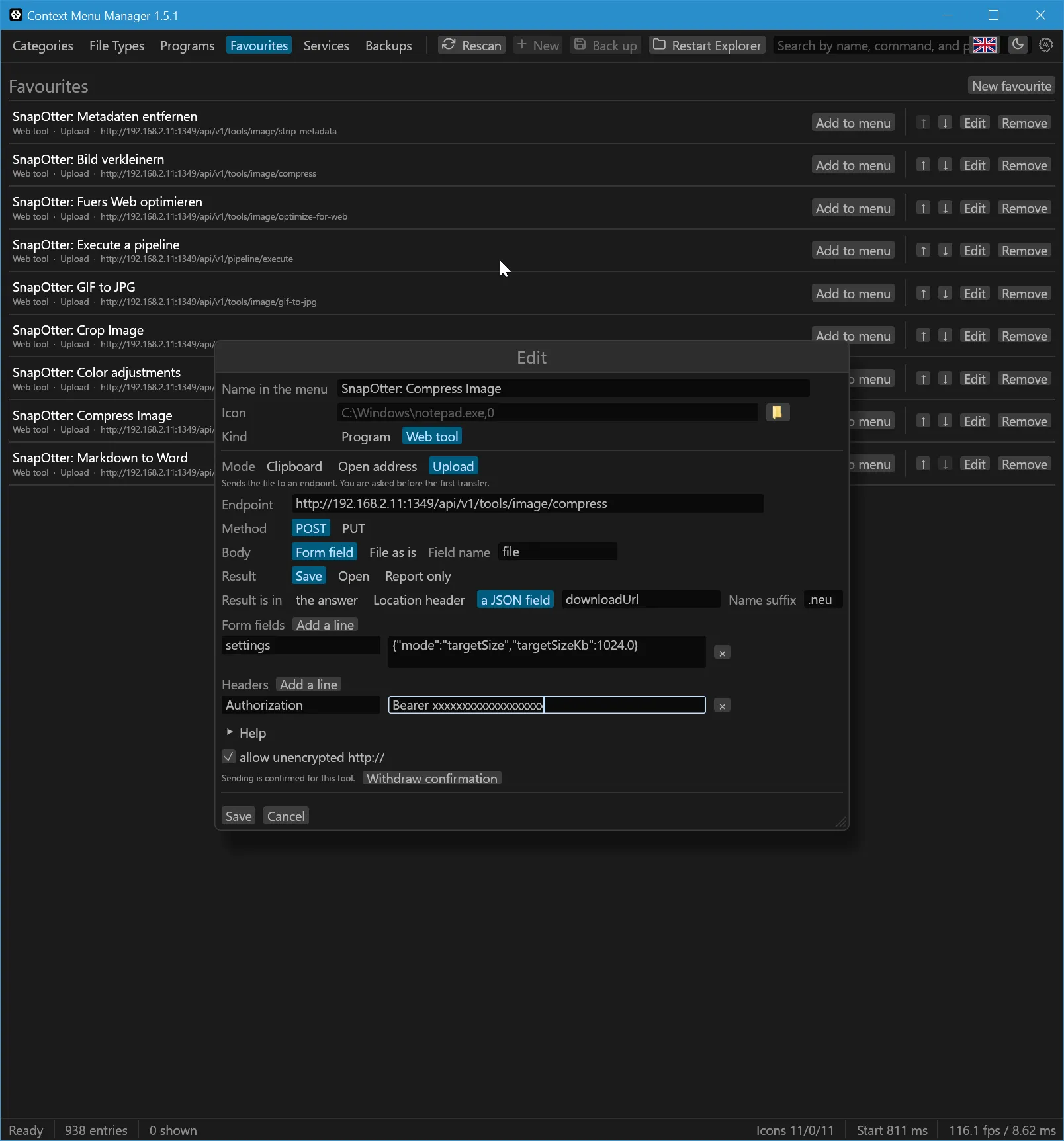
The list
Each row carries Add to menu, two arrows that move it up or down, Edit and Remove. That order is saved and is the order the entries appear in. The keyboard does the same: arrows, Home and End move the cursor, Enter places the favourite, Delete takes it out.
Add to menu asks for the where, and takes one of three answers: a base
category, a single extension such as .png, or a whole kind of file, where
image covers every image format Windows knows.
Why a web tool needs a sender
A favourite does not have to be a program. If the tool lives in a browser,
there is a problem no registry entry solves: a web page may not read a file
off your disk. An address like https://tool.example/?f=C:\shot.png opens
the page, but the file never arrives, because no browser allows that — and that
is a good thing.
So the file has to be sent, and that takes a sender. The sender is this
program. The menu entry calls ctxmenu --favourite <id> "%1", and what happens
next depends on the mode.
The three modes
Clipboard
The file lands on the clipboard, the page opens, and Ctrl+V in the browser finishes the job. This is the way for tools that offer no interface at all — Squoosh, the TinyPNG page, remove.bg. No key, no endpoint, and it works with tools that never planned for it. For a PNG the image itself is put on the clipboard as well, so pages that expect an image rather than a file are satisfied too.
Upload
For tools with a real endpoint. The file goes out as multipart/form-data
with a field name you choose, or as a raw body, and header lines carry a key
where one is needed.
A multipart request can take plain form fields beside the file, which is where a tool's settings travel: one field holding the JSON block the service asked for, or one field per option where the service names them separately.
What comes back is saved beside the original, opened in the browser, or just
reported. Saving never overwrites: shot.png becomes shot.min.png, with the
suffix you set. Where the answer only names an address, the program reads it
from the Location header of a successful answer or from a JSON field such as
output.url.
Open address
Builds an address from placeholders and opens it, transmitting nothing.
Available are {name}, {stem}, {ext}, {path}, {dir} and {fileurl},
each correctly encoded. For a search, a wiki, a ticket form.
Twenty-one services are already in it
A new web favourite offers a list of the services this program knows, by group: share images, share files, edit images, documents, share text, development, storage of your own, check a file. One click fills in the endpoint, the method, the body shape, the field name, the header line and where the answer names the result — everything except the key, which no list can hold. Where a key is needed, the note says where to get one.
Two of them do something worth naming. TinyPNG documents --user api:KEY;
type that pair into the header's value field and press Basic, and the line
curl would have built is built. VirusTotal answers an upload with a job id
and no address, so the address of the page is built from the file's own
SHA-256 instead — which is how it names its pages anyway.
The list is a JSON file in the repository, not code: adding a service is a pull request on a text file. The formats page says what may go in it.
Beside the list stands From a .sxcu file, which reads an uploader file ShareX published for a service. What such a file holds that this program cannot do — content in a form field rather than an attached file, an answer read by regular expression — ends the import with a sentence naming that thing, rather than with a favourite that fails later at a real service.
What it refuses, and what it asks
You are asked before the first upload. Once per tool, naming the destination and the size of the file. The answer is remembered, and it can be taken back: the form says in a line that sending is confirmed for this tool, and the button beside that line clears it, so the next click asks again.
Tools made from a service are the exception. The service was set up with its address and its key in one deliberate step, so its tools count as agreed to from the start and send on the first click.
Unencrypted http:// is refused unless it has been allowed for this one
favourite. Sending a file across the network in the clear is meant to be a
decision, not a default.
A key does not follow a result to another host. Where a service answers with an address, that address is fetched with the same headers only if it is on the host the file went to; TinyPNG names its output under its own host and needs them. An address on a bucket or a CDN somewhere else is a host nobody agreed to, and it is fetched without them.
A redirect ends the request. A 3xx is not followed; the program reports
which address it pointed at instead. The question before the upload named one
host, and a service that answers by pointing somewhere else is asking for a
decision nobody took. If that other address is the right one, it belongs in the
endpoint.
The transfer itself runs through WinHTTP, which is to say Windows' own client, with the certificate store and the proxy settings that apply anyway.
A queued job is waited out
A busy service answers with a receipt instead of a file — a 202, or a 200
carrying "async": true. Which of the two arrives depends on how busy the
service is, not on the endpoint, so it cannot be settled when the favourite is
made.
The program reads the job number out of the receipt and asks the service's own progress path about it every one and a half seconds, for at most two minutes, then saves the finished file as if it had come back straight away. A frame that reports the job failed ends the wait at once rather than running out the clock. This needs the description to name a progress path, and the favourite to say where the answer names the finished file.
Six files, one question and one message
Windows reads a context menu command ending in "%1" as "once per file", so
six selected files start six copies of this program, none of which knows about
the others.
They agree among themselves through one file per favourite and run under
%TEMP%\ctxmenu-batch\. One of them asks the question before the first
upload; the other five wait for that answer and act on it, a no included, in
which case nothing is sent at all. At the end they share one notification
instead of six: headed with the name of the tool, listing the file names one
under the other, updated as each file finishes rather than popping up again.
A single file still reads exactly as it did, with the whole sentence and no counter. A file that fails keeps a message of its own, because the reason is worth more than the tidiness. And if the six cannot reach each other, every one of them asks and reports alone: six messages are a nuisance, a file that was never sent is a fault.
Where they are kept
%LOCALAPPDATA%\ctxmenu\favourites.json, next to the other stored files. It
survives an update, and an older version of the program reads what a newer one
wrote.
The same list is reachable from the console — ctxmenu favourite add, place,
remove and run, with every switch in Command line.
Last updated